Resetting the headset & Initializing the headset to restore factory settings
Resetting the headset
If the headset cannot be turned on or cannot be operated even when it is turned on, press both the  (power) button and the NC/AMB (noise canceling/Ambient Sound Mode) button simultaneously while charging. The headset will be reset. The device registration (pairing) information is not deleted.
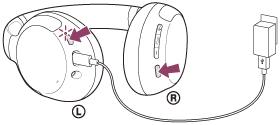
If the headset does not operate correctly even after resetting, initialize the headset to restore factory settings.
Initializing the headset to restore factory settings
If the headset does not operate correctly even after resetting, initialize the headset.
Turn off the headset while the USB Type-C cable is disconnected and then press and hold the (power) button and the  (play/call) button simultaneously for 7 seconds or more.
The indicator (blue) flashes 4 times (  ), and the headset is initialized. This operation resets volume settings, etc. to the factory settings, and deletes all pairing information. In this case, delete the pairing information for the headset from the device and then pair them again.
If the headset does not operate correctly even after initializing, consult your nearest Sony dealer.
https://helpguide.sony.net/
Comments
Post a Comment